Cohesivo product guide
What is Cohesivo
Cohesivo is a content management system (CMS) that combines content management with tools that put your customers first.
Multilingual, multichannel, and extensible, Cohesivo is an advanced Content Management Framework (CMF) with product catalog capabilities, and a Digital Asset Management (DAM) repository. It provides a complete back office to collaboratively create content, and several APIs to distribute this content.
On top of content management, Cohesivo offers smooth consumer journey and great online experience. It empowers editors to quickly create new pages or personalized content, and improves their daily work. It also provides tools for segmentation and targeting, and it can be widely used in B2B thanks to its features and integrations.
To add e-commerce capabilities, such as cart, checkout, payments, or order management, install the Commerce SDK. For more information, see Commerce SDK.
Headful and headless
A CMS can deliver content to visitors in two ways:
- Headful - the website that visitors see is bundled with the CMS itself. One application handles both managing the content and displaying it.
- Headless - the CMS is a standalone application for creating and changing content. One or more separate applications, such as a website or a mobile app, are responsible only for displaying the content, and get it from the CMS through an API.
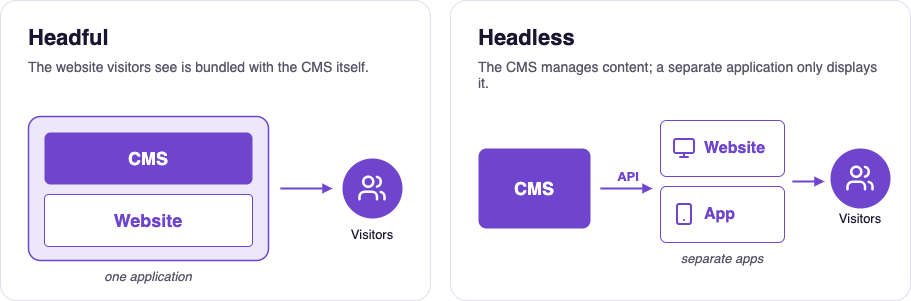
Both models are available in Cohesivo, with some variations depending on the deployment model.
Deployment models
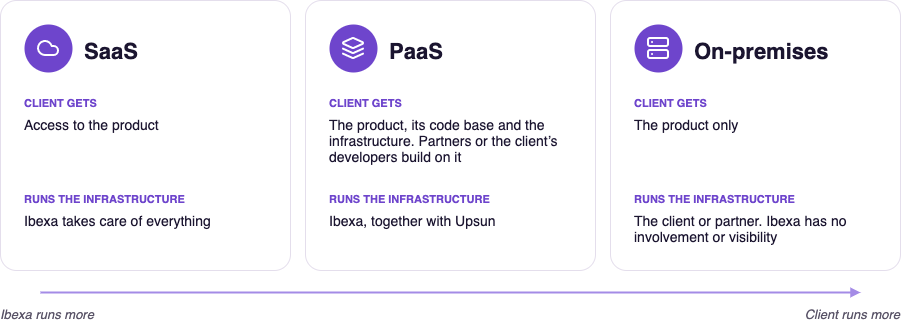
You can deploy Cohesivo in three ways. The difference is who runs the infrastructure:
- On-premises - you get the product only. You or your implementation partner own and run the infrastructure entirely, without involvement of Ibexa. For more information, see Install Cohesivo.
- PaaS - you get the product, its code base, and the infrastructure. Implementation partners or your own developers can modify the product and build on it. Ibexa runs the infrastructure in cooperation with Upsun. For more information, see Ibexa Cloud.
- SaaS - you get access to the product, and Ibexa takes care of everything else. For more information, see Cohesivo SaaS.
Availability
To start using Cohesivo, you need a subscription.
Contact us or one of our partners to learn more about pricing.
How it works
Editorial stage
You access with any web browser from any platform to a rich back office, the main place to
- define users and their rights (for example, customers, subscribers, or editors),
- organize content (content types, fields, tree, tags, languages, and more),
- edit content in a collaborative workplace with versions and workflows,
- build pages and forms, and target content to specific audiences.
Then, content is available to end users through websites, REST, GraphQL, or every output you can imagine like apps.
Technical backstage
With an active subscription, you can start the installation process that uses Composer, on an architecture including at least a web server with PHP and a relational database server. For performance, several bricks can be added to your stack such as a reverse proxy or a search engine.
Cohesivo is based on Symfony. With a help of documentation and trainings, any developer familiar with Symfony or simply PHP may learn how to use available extension points and extend the platform.
By using a version control system and environment variables, you can deploy your configuration and extensions on several environments, including Ibexa Cloud.
Standard web APIs and Ibexa Connect help establish interoperability, even if you aren't an advanced developer.
APIs summary:
- The REST and GraphQL APIs give access to the content in standardized ways.
- The OAuth 2 client allows to connect to an SSO.
- The design engine and its theme templates mechanism allows to serve the content in several shapes.
- The PHP API opens Cohesivo to extendability to fit your needs. For example, content can be computed, edited, or served in specific ways such as scheduled/live imports/exports, automated edition tasks, or specific controllers to communicate with other applications.
Capabilities and benefits
Core features
The core of Cohesivo offers everything to structure your content repositories and access them.
Content model
Content modeling and management are the foundation of Cohesivo with the following main layers:
- Content items are organized as a tree in a repository.
- An item can have multiple locations in this tree.
- Content items are typed.
- Content types are sets of typed data fields, with optional conditions on the possible values.
- Rich Text field type comes with an online editor.
- Multilingual, it can store a content in several languages, the content model defines which field must be translated, and which don't vary.
For more information, see Content management product guide.
User management
User and user group rights are set by roles with thin granular limited permission policies in a safe deny-by-default security system. Users are content items as well, so your knowledge about content management is reused.
For more information, see User management product guide.
Content access
There are many paths to access the content in many shapes:
- The REST API and GraphQL API support access to, and edition of the content.
- Cohesivo offers a complete PHP API to extend the ways to access content.
- A design engine and a view controller offer to create plain text content views (such as HTML, JSON, XML, CSS, JS, CSV, or Markdown), and to factorize those views by using theme cascades. This design engine is used in the back office which is equally extendable.
- Multichannel, content can be accessed through several channel configurations, such as the domain name it replies to, the sub-part of the content tree it starts from, the users rights, or the design theme. The back office itself is such a channel.
- Multi-repository, the same platform can use separate databases if data isolation is needed between channel groups.
Customer experience features
Cohesivo comes with a variety of features designed to help you create an exceptional customer experience.
Page Builder
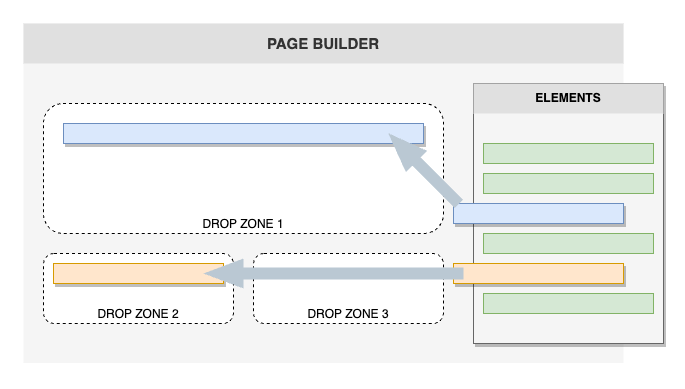
Page Builder is a powerful visual tool that helps you design and modify pages, without requiring advanced technical skills. With its intuitive and user-friendly interface, you can develop pages, tailor content, and create perfectly targeted landing pages. You build pages from ready-to-use elements called blocks, which can be easily configured and customized to suit your needs. Before you start building a page, you also need to select a layout. It has a significant impact on how the content pieces in the drop zones are arranged.
Form Builder
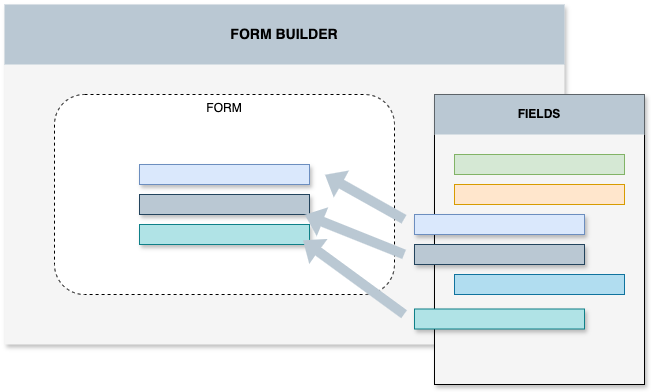
Form Builder is an intuitive tool that allows you to transform user engagement on your website. With this tool, you can design, deploy, and manage online forms quickly. You can create a variety of forms that consist of different fields, including sign-up forms, surveys, or questionnaires. Additionally, you can monitor and manage the information obtained from website visitors and adjust your forms if needed.
Site Factory
Site Factory is a site management interface, integrated with the back office. It enables you to configure new sites without leaving the administration interface and editing SiteAccess configuration. With this feature you can create and deploy multiple websites at lightning speed and at scale. It allows you to manage expenses and resources while industrializing your web presence. Additionally, together with localized information and tailored product catalogs and prices, it helps you to quickly enter new markets.
Customizable dashboard
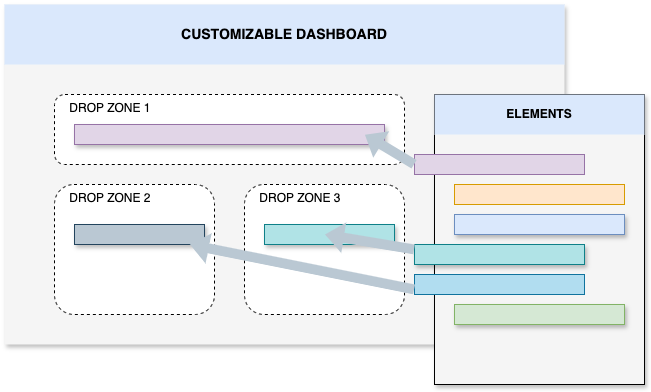
You can customize the dashboard with the Dashboard Builder. You can tailor dashboard to your specific needs by choosing from a set of widgets. You can easily preview the sections that you use more often and omit the less significant ones.
Content scheduling
You can take complete control of where and when your content blocks are visible to your predefined audiences and schedule content publication. The Publish Later feature allows you to schedule personalized content and reach different user groups at optimal dates and times to boost performance. What's more, you can turn specific content pages and blocks on and off to meet the needs of your marketing campaigns and promotions. Publish Later feature combined with Page Builder allows you to see all changes that you plan for the future. To do it, just use the slider to see all the upcoming changes.
Visitors can discover new content at midnight, during weekends or vacations, even when the editorial team is absent or reduced. A calendar summarises those scheduled content events. Like everything in the back office, the calendar is extendable: you can add an event source to coordinate content events with other company events.
Customer Portal
Use the Customer Portal and customer management capabilities that come with it, to establish new corporate accounts, manage existing ones, and communicate with your partners within a personalized space. With the help of this feature, you can create customized areas that give users a smooth, integrated experience and provide them with access to a variety of resources, apps, and services from a single point of entry. Using this tool, your customers can change their organization details, invite and see members, self-register, and more.
Segments
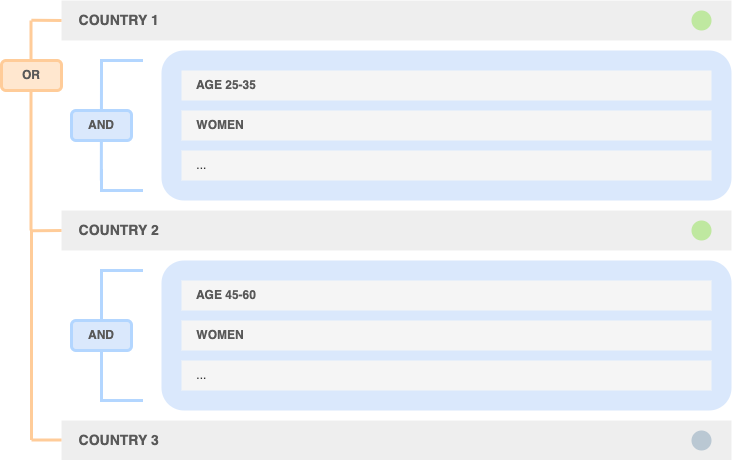
Segmentation allows you to split up the user base. By assigning users to segments, you can display specific content to selected visitors and tailor the content that they can see. One of the tools that you can use right out of the box is the Targeting block that is available in the Page Builder.
Advanced features
Many ways to structure and organize content
Product catalog helps organize complex products and their catalogs:
- Products are organized by using product types, variants, catalogs, categories, and tags.
- Product attributes are grouped and factorized among product types. For example, fabric + color + size can be shared by many clothing product types.
- Product variants can rapidly be created by the automatic declination of attributes that have a defined set of values.
- With taxonomy, you can tag content items to organize them by topics in a much intuitive way for the editor than a content tree with multiple locations would. Tags themselves are organized in a tree. Tag organization can be handled by a supervisor who doesn't need to move content items around a corporate content tree. At search time, tags can be keywords with a high value in relevance score to help the end user having results closer to the searched topic.
Collaboration
Several features help end users collaborate on the content, such as:
- Version comparison helps track changes and solve concurrent editing conflicts.
- Workflows helps with collaborative editing chain. A built-in “Quick review“ workflow allows an editor to send a content draft to a colleague for review, and comment or publishing. But, as a framework, more complex workflows can be imagined, with several steps and paths, even some automated tasks.
Accelerated content editing
- Cohesivo's content tree has several actions available directly on its items. For example, no need to open a content to hide it, you can do it directly from the content tree.
- An Image Editor offers to crop and flip images. When serving the image in various context, you can even set a focal point to indicate to automated cropping which part of the image should be kept.
- A Digital Asset Management (DAM) helps you crawl through your image resources to use and reuse them in your content. And a DAM connector allows you to search for images hosted on third party DAM servers.
- AI Actions help you automate time-consuming editorial tasks.
Network integration
Intranets and extranets
- Ibexa Connect's role is to create application interconnections with low code and drag-and-drop, in a compelling visual interface. Complex data flows can be easily implemented with a huge library of connectors and actions for famous to specific applications. For more information, see Ibexa Connect product guide.
- An OAuth 2 client supports authentication with a third-party OAuth 2 server.
- A DAM Connector, previously mentioned, helps to access any image repository when needing to illustrate a content.
- Cohesivo supports Elasticsearch and Solr. It gives the choice between using Solr or Elasticsearch as a search engine, whether hosted on Ibexa Cloud or on-premises. This choice might be influenced by technology you already use, or you want to invest in for other internal projects.
- Cohesivo offers to export and import from command line part of the content model or content items. For example, it can be used to move new content types and items from a staging instance to the production one.
Internet, delivery, web search engines, and social networks
- Cohesivo comes with the support of Fastly content delivery network (CDN). The HTTP cache varies on current user's role and is purged when content changes. With its huge network of points of presence (POP) around the world, Fastly is quickly delivering cached content from nearest server for a better user experience.
- A Search Engine Optimization (SEO) field implements best practices about web search engine indexing and social network sharing. It covers canonical URLs which are mandatory if multiple locations are used for a same content item to avoid duplicate content, Open Graph protocol to better describe a content item to social networks and search engine, and Twitter Cards.
Available add-ons
You can extend Cohesivo with add-ons, for example:
- Raptor connector allows you to recommend content to end users according to their behavior, or, when authenticated, by matching with their segment/group. You can assign users to different recommendation groups and create advanced logic with operators to provide your audience with the best recommendations.
- Raptor CDP (Customer Data Platform) allows you to create complete customer profiles, including their interactions, behavior, and preferences. It helps you improve user engagement, conversion rates, and return on investment by segmenting your audience and delivering tailored campaigns and experiences. To use it, you must make arrangements with Ibexa to define the initial configuration.
- Qualifio is a data collection tool. It gives you the ability to use the Qualifio tools to engage your audiences with quizzes, polls, and forms. To promote your campaign, you can add a Campaign block to a page in Page Builder or embed a campaign within the Rich Text field by using a Campaign custom tag. To use it, you must make arrangements with Ibexa to define the initial configuration, and then get and set up a user account.
- OAuth server offers the possibility to use the platform as the authentication service for other applications.
Use cases
Brick and mortar, but with an online showcase
If you prefer the human warmth of a retail store, if your products' numerous complex options should be discussed, or if you're not ready yet to sell online, Cohesivo helps to build an exposition of your product catalog and your philosophy, an online presence to keep earlier customers interested and gather new ones. When you're ready, you can become an online store by installing the Commerce SDK.
Large network with multiple inputs and outputs
Departments, subsidiaries, and even partners now produce content in the same repository from the same collaborative workspace. Thanks to migration feature and PHP API, existing content has been imported from previous repositories. Fine-tuned user rights and workflows ensure that each collaborator can focus on their own tasks without the risk to disturb the content model or content organization. Content is distributed on several websites and applications, some running on the Ibexa platform itself, some on third parties' servers, some as native mobile apps. Part of the content has multiple locations or is translated, and reused from place to place. While the back office offers to search into the whole repository, the front end apps have correctly circumscribed search capabilities.
Build new pages and integrated forms
With Page Builder and Form Builder, you can build new pages or forms quickly and efficiently. Page Builder comes with predefined layouts, blocks, and templates to streamline your design process, while Form Builder provides ready-to-use elements for easy form creation. You can integrate your custom forms and surveys into the website and reuse content from existing sites on new ones. With Site Factory, you can publish as many sites as you like, there are no limits.
Target customers in their preferred channels
To make your products attractive, you must remember each of your customers is unique and special, and tailor your marketing strategy to their needs and preferences. Cohesivo allows you to deliver personalized content through different channels. With segmentation, you can define audiences to distribute specific content through the right channels, at the right time. Available add-ons give you even more possibilities. You can deliver recommendations, analyze customer behaviours, use interactive content, and collect important data.
Build your future
Planning and scheduling is a part of management. With scheduling tools, you can prepare content publishing timetables, schedule how your website can evolve, and test or preview it before publication. Additionally, you can use editorial calendars for an easier collaboration.